1 · Write a web page
An index.html, some CSS, some JavaScript — the same things you would write for a website. Any editor, any framework, or none.
app/index.htmlWorkingArdaForm turns a Raspberry Pi, a small PC or an Android tablet into a device you can install anywhere and look after from your browser. Write the screen as an ordinary web page — HTML, CSS and JavaScript — push it to GitHub, and every device picks it up by itself, at a moment your app agrees to. Then see its screen, change its settings and fix it from the portal, wherever it is.
NEW Now on Android — tablets, displays, TV boxes
The ArdaForm idea
A touchscreen in a shop shouldn't need a 200 MB runtime, a folder of hardware shell scripts and a week of Linux configuration before it does anything useful.
If you can write basic HTML and JavaScript, you can build an app and run it on one device — or hundreds. The app is an ordinary web page. Deploying it is a push to GitHub. Setting up a device is writing a card and typing a code. You don't need to know Linux, networking or how a device talks to the portal: that part is ArdaForm's job.
An index.html, some CSS, some JavaScript — the same things you would write for a website. Any editor, any framework, or none.
app/index.htmlWorkingOne program opens your page in a window that behaves like the device — touchscreen, settings and data included. No hardware needed yet.
ardaplayer -devWorkingConnect the repository to your project in the portal once. From then on, every push reaches your devices by itself.
git pushWorkingWrite the ready-made image to a Raspberry Pi card or a USB stick, switch on, and type the code it shows into the portal. The tenth device is the same as the first.
Add deviceWorkingArdaForm is not a UI framework. It is everything underneath — getting the app onto the device, talking to printers and scanners, keeping data in step, looking after a fleet — so you can spend your time on the screen people actually touch.
Push a commit and ArdaForm packs your app into one encrypted file that only your devices can open (a sealed .arda, AES-256-GCM). It is opened in memory, never unpacked to disk, so no readable source sits on hardware you don't control.
app.ardaWorkingPrint a receipt, read a barcode, show a camera, dim the screen, join Wi-Fi, call your own server — all from ordinary JavaScript. Receipt and label printers, USB-serial, barcode and NFC readers, IP cameras, screens, audio, an on-screen keyboard and webhooks, through one object.
Arda.printers.print()WorkingKeeps working when the internet doesn't. The data your app reads is kept on the device, each device getting only its own share. Anything it saves — a sale, a check-in — waits safely on the disk, even through a power cut, and is sent when the line is back.
Arda.db.push()WorkingFrom the portal: what its screen shows right now, the app's console, a line of JavaScript run in the page, a full-resolution screenshot, its log, and a terminal on the machine — without visiting, and without opening anything on the shop's network.
Device viewWorkingConnect your GitHub repository once. Every push after that reaches your devices by itself: each one checks the update is genuine, gets it ready, and switches over when your app agrees — as soon as it lands, overnight, or only when asked.
git pushWorkingReady-made images for a Raspberry Pi card and a PC, and a USB installer you click through on the screen: choose the disk, a name, the Wi-Fi and an install code. No Linux setup. The device registers itself and keeps its own software up to date from then on.
ardaplayer-rpi-arm64.img.xzWorkingTalking to hardware is usually where a web developer has to stop. Here it is a function call. ArdaPlayer puts one object, window.Arda, in your page before your first line runs — nothing to install, nothing to compile, no Python scripts on the side — and it is the same object on your desk, on the kiosk, and on a box with no screen at all.
Arda — device, config, datasets, files, keyboard, screens, audio, cameras, printers, serial, Wi-Fi, updates, webhooks.ardaplayer -dev myapp/ runs it in a window with a pretend touchscreen and a pretend radio. Power calls are simulated; nothing touches your laptop.1// The settings the operator typed in the portal
2const name = Arda.config.kiosk_name ?? 'Reception'
3
4// A synced dataset — asking is subscribing
5let members = await Arda.db.dataset('members')
6Arda.on('sync', async (ds) => {
7 if (ds === 'members') members = await Arda.db.dataset(ds)
8})
9
10// A badge scanner is a keyboard wedge; the player knows which one
11Arda.on('barcode', async (s) => {
12 const m = members[s.text]
13 if (!m) return refuse()
14 // Durable: queued on disk, delivered when the line is back
15 await Arda.db.push('visits', { member: m.id, kiosk: name, at: Date.now() })
16 welcome(m)
17})1// A manager's override on a till with no keyboard
2const pin = await Arda.keyboard({ layout: 'pin', title: 'Manager PIN' })
3if (pin === null) return // cancelled
4
5// Print: the player owns the port, you own the bytes
6const [p] = (await Arda.printers.list()).filter(x => x.usable)
7await Arda.printers.print(p.id, escpos(receipt, { dots: p.dots }))
8
9// The customer display speaks its own protocol over USB-serial
10const [vfd] = await Arda.serial.list()
11await Arda.serial.open(vfd.id, { baud: 9600 })
12await Arda.serial.write(vfd.id, encode('TOTAL £12.99'))
13
14// Let an update in only between sales
15Arda.on('updateStart', () => {
16 if (midSale()) { Arda.update.pause(); afterSale(Arda.update.apply) }
17})1// A second display is a real document you write into
2await Arda.screens.ready()
3const board = Arda.screen['queue']
4const now = document.createElement('h1')
5board.body.appendChild(now) // adopted, still yours
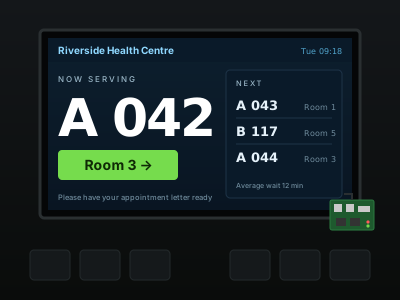
6now.textContent = 'A 042 → Room 3'
7
8// Whatever the connected screen allows
9await Arda.screens.set(null, { brightness: 40 }, true) // and again at every boot
10await Arda.audio.set({ volume: 35 })
11
12// Lay the app out for the machine it is on
13const { can } = await Arda.device()
14document.body.classList.toggle('touch', can.touch && !can.keyboard)
15
16// Close the shop
17closeBtn.onclick = () => Arda.system.shutdown()You push; the devices do the rest. Each device keeps its own connection out to ArdaForm, so there is nothing to set up on the customer's network — no ports to open, no VPN — and every update, lock or wipe is signed for that one device and checked by it before anything happens.
Your repository, your editor, your way of working. Push as you always do.
ArdaForm packs your app folder into one encrypted file. Nothing from your repository is ever run.
A signed instruction per device, carrying the file's fingerprint (sha256) and its key. A device that is switched off gets it when it comes back.
Downloaded, checked, made ready — and swapped in when your app says it's a good moment. Never mid-sale.
The images exist so that turning hardware into a device is a job you can hand to somebody who has never opened a terminal — and a headless box on a cable can be adopted without touching it.
Download the Raspberry Pi image, the PC image or the USB installer from the portal. The installer is ArdaForm running an install app: choose the disk, name the machine, join Wi-Fi, type an install code — on a touchscreen or a keyboard.
WorkingIt shows a short code on its screen; type it into the portal and the device is yours. No screen? A device on your network appears in the project's Adopt tab, one with no network is found over Bluetooth and handed its Wi-Fi from the browser, and an install code registers it before anybody logs in.
WorkingThe device downloads your app and its data, checks them, and starts the app as soon as what it needs to begin with is there — pictures keep arriving behind it.
WorkingWhen a new ArdaPlayer is released, devices update themselves: each one checks the download, proves it starts, switches over at the next restart — and goes back to the previous version by itself if the new one cannot stay up.
WorkingArdaPlayer is also an Android app: the same player, the same app, the same portal — on the tablets, the displays with Android inside and the TV boxes a business already owns. No card to write and no image to flash: open a link on the tablet, install, and type the code it shows into the portal.
On a tablet beside the till it runs your app like any device: its data kept through a lost connection, Wi-Fi receipt printers found on the network, the battery and its charge in the portal, the screen held in landscape or portrait. Staff can still switch to other apps.
Android 7+WorkingMake the player the box's device owner once — one command on a freshly reset tablet — and kiosk mode becomes a switch in the portal: no status bar, no Home, no Recents, the player starting with the box. Switch it off from the portal when the box is needed for something else.
Kiosk modeWorkingMany commercial displays and most TV boxes run Android. Play video and pictures from the project's files, offline, with no Raspberry Pi behind the screen and no second power supply. One app covers 64-bit and 32-bit ARM and x86-64 boxes.
<video>WorkingIf it has a screen, a plug and a job to do, it's an ArdaForm device. The same runtime, the same portal, a different app.
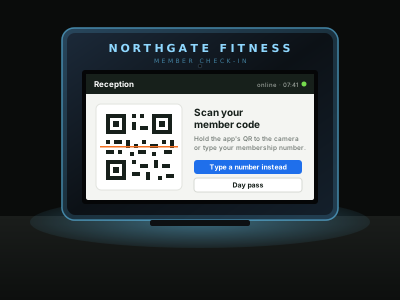 01
01A badge or a QR read by a USB scanner, the visit saved even if the line is down, a welcome on the glass. A day pass sold from the same screen.
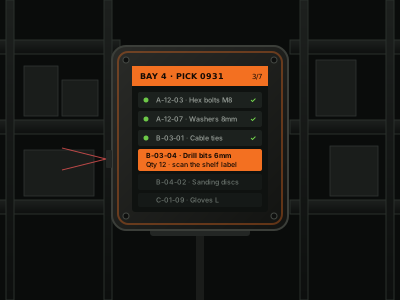 02
02The pick list synced per bay, each scan attributed to the scanner that made it, and the list still there when the Wi-Fi in aisle nine isn't. The bay's camera plays beside it.
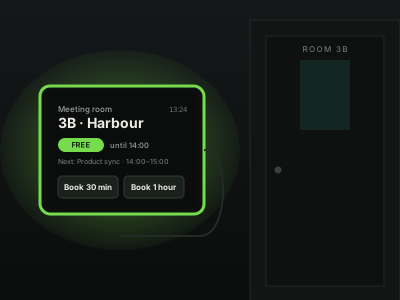 03
03A Pi behind a seven-inch panel on every door, adopted over the office network without a keyboard, its edge light driven from the booking data.
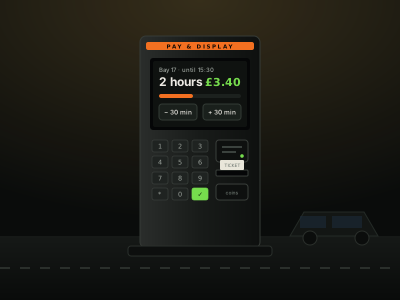 04
04A keypad, a card reader on serial, a receipt printer — and an operator who can see the screen from the office when a driver rings.
 05
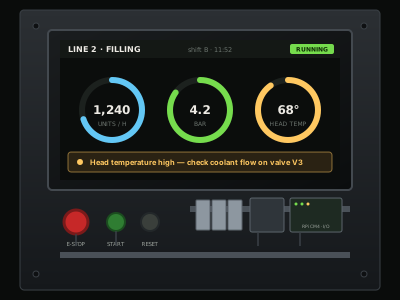
05A panel PC on the cabinet door, the PLC on the other end of a serial cable, and a night-time update window so the line never sees one.
 06
06A big screen driven by a Pi the size of a card, updated from the same dataset the counter staff write to, screenshot on request.
Devices live in shops, factories and reception areas — physically accessible to people you've never met. ArdaForm assumes that from the start.
Every update, lock and wipe is signed for one specific device (Ed25519), and the device checks it before it acts. One device's wipe cannot be replayed at another. A reboot is asked live, over the device's own connection, and never queued.
Your app and its data are encrypted with a key that belongs to that device and the board it sits in. Copy the card into another machine and it opens nothing.
The device calls out; nothing can call in. Its firewall answers nothing it did not ask for, and even SSH stays shut until you open it from the portal, for a set time.
Remote support reaches only what the device itself offers — its screen, its shell — by name, never an address of our choosing. ArdaForm's side cannot turn a device into a way into its owner's network.
The short answers. The help pages and the developer manual have the long ones.
ArdaForm is a platform for building, deploying and remotely managing dedicated applications on Linux and Android devices. You write the application in HTML, CSS and JavaScript and push it to a git repository; ArdaForm packs it, delivers it to the hardware running the ArdaPlayer runtime, and gives you a portal to update, watch and support every device in the field.
Raspberry Pi 3 and 4 boards with HDMI or DSI touchscreens, and x86-64 machines such as mini PCs, panel PCs and point-of-sale terminals. Ready-made images and a USB installer are downloadable from the portal; an existing Debian machine can be converted. Android tablets, displays with Android inside and TV boxes (Android 7 or newer) run the ArdaPlayer app instead.
Yes. ArdaPlayer is also an Android app for tablets, displays and TV boxes, installed from ardaform.net rather than Google Play. It runs the same app with the same data and the same portal; set up once as the box's device owner, it can be locked to the app from the portal.
Yes on real hardware: the runtime, the device images, the Android app, git deployment, data sync, remote support and self-updating players run on devices in production today. Anyone can create a portal account; the free plan needs no card.
ArdaForm is for anyone putting a screen to work — web developers, integrators and software vendors alike. The runtime and the images are real, and the portal is open — create an account; the free plan needs no card.