Raspberry Pi
ardaplayer-rpi-arm64.img.xz. Write it to a card with Raspberry Pi Imager, balenaEtcher or dd. Pi 3 and 4; HDMI or a DSI touchscreen — the image probes the panel at boot and configures itself. The first boot grows the card.
The whole path, in the order you will walk it: write the app, run it on your desk, connect the repository, make a device, adopt it, watch it, update it, retire it. Every portal screen is shown beside the step, with example data. It is written so that a person — or an AI assistant working from the Markdown copy — can follow it end to end.
The example throughout is a gym's member check-in kiosk: tenant Northgate Fitness, project Check-in, a Raspberry Pi in a frame on the reception desk. Swap the names for yours; nothing else changes.
| Term | Meaning here |
|---|---|
| Tenant | Your organisation in the portal. It owns projects, people and API keys. |
| Project | One application and everything around it: branches, datasets, files, settings, devices, install codes, webhooks. |
| Branch | A deployable line of the project — main, staging. Each is connected to one git ref and carries an apply policy. A device follows exactly one branch. |
| Device | One installation of ArdaPlayer with an identity it generated itself, a branch, and a data partition. |
| Partition | Which share of the data a device gets — one site's members, one till's prices, one room's bookings. |
| Datasets · files · settings | What ArdaForm keeps up to date on each device: records (a price list, a member list), pictures and documents, and the values an operator types. |
You need a workstation (Linux, macOS or Windows), a GitHub account, and a portal account (create one — the free plan needs no card). For steps 1 and 2 you need nothing else. For step 4 you need a Raspberry Pi 3 or 4 with a card, or an x86-64 machine with a USB stick.
An ArdaForm app is a folder. There is no build step on the platform's side and nothing to install in the page.
The layout is fixed and small. app/ is the whole application — index.html at its root and every asset it uses — and it is the only thing that is ever sent to a device. Everything beside it stays yours, apart from an optional gui/ that the portal reads (below).
checkin/
├── app/
│   ├── index.html          ← the app's root; the player serves app/ and only app/
│   ├── app.js
│   ├── style.css
│   └── manifest.json       ← optional: datasets, settings, files the app needs at boot
├── arda.dev.json           ← developer settings, BESIDE app/, never packed
├── gui/                    ← optional: the app's own settings page, for the portal
├── seed/
│   └── members.json        ← optional: local records for developing without a server
├── data/  storage/  state/ ← the player's own; created on first run, keep out of git
└── .gitignore
The page is ordinary HTML. The one ArdaForm-specific thing is window.Arda, which the player puts in the page before your first line runs — no script tag, no import.
<!doctype html>
<html lang="en">
<head>
  <meta charset="utf-8">
  <title>Northgate · check-in</title>
  <link rel="stylesheet" href="style.css">
</head>
<body>
  <header><b id="kiosk"></b> <span id="state"></span></header>
  <main>
    <h1>Scan your member code</h1>
    <button id="type">Type a number instead</button>
  </main>
  <script src="app.js"></script>
</body>
</html>
// Settings the operator typed in the portal — a frozen object, readable on line one.
// A setting nobody set is ABSENT, which is why ?? is right and || is wrong.
document.getElementById('kiosk').textContent = Arda.config.kiosk_name ?? 'Reception'
// Device state: registered? locked? what can a person do at this machine?
Arda.device().then(function (d) {
document.getElementById('state').textContent = d.phase // local · unregistered · initialising · ready
document.body.classList.toggle('touch', d.can.touch && !d.can.keyboard)
})
Arda.on('device', function () { location.reload() })
// A synced dataset. Asking is subscribing; the first answer is usually {} — listen for 'sync'.
var members = {}
Arda.db.dataset('members').then(function (m) { members = m })
Arda.on('sync', function (name) {
if (name === 'members') Arda.db.dataset(name).then(function (m) { members = m })
})
// A barcode reader is a keyboard wedge; the player says which reader it came from.
Arda.on('barcode', function (s) { checkIn(s.text) })
// No keyboard on the kiosk: ask for one. Resolves the string, or null on cancel.
document.getElementById('type').onclick = function () {
Arda.keyboard({ layout: 'numeric', title: 'Membership number' }).then(function (n) {
if (n !== null) checkIn(n)
})
}
function checkIn(number) {
var m = members[number]
if (!m) return say('Not a member — see the desk')
// Durable: written to the outbox on disk, delivered when the line is up, at least once.
Arda.db.push('visits', { member: m.id, at: Date.now() }).then(function (r) {
say('Welcome back, ' + m.name) // r.seq is the outbox sequence number
})
}
// Let an update in between check-ins, not during one.
Arda.on('updateStart', function (u) {
if (!busy()) return // say nothing: it applies in 5 s
Arda.update.pause() // buys 60 s, up to 5 times
whenIdle(function () { Arda.update.apply() })
})
// console.* is kept on the device and shipped to the portal when somebody switches capture on.
console.log('check-in ready')The manifest is the developer's declaration of the datasets the app reads, the settings an operator may type, and the files it wants before it starts. The portal creates and updates these definitions when a release is packed; it never deletes one. Values stay the operator's.
{
  "datasets": [
    { "key": "members", "access": "ro", "api": "rw", "partition": "site", "needForBoot": true },
    { "key": "passes",  "access": "ro", "needForBoot": true },
    { "key": "visits",  "access": "rw", "retention": { "days": 400 }, "size": "50MB" }
  ],
  "settings": [
    { "key": "currency",   "caption": "Currency",        "type": "select", "options": ["GBP", "EUR"], "default": "GBP" },
    { "key": "pass_price", "caption": "Day pass price",  "type": "number", "unit": "£", "default": 8 },
    { "key": "kiosk_name", "caption": "Kiosk name",      "type": "text",   "perDevice": true }
  ],
  "files": { "needForBoot": ["banners"] }
}| Dataset key | Meaning | Default |
|---|---|---|
key | The name the app asks for: Arda.db.dataset('members'). Letters, digits, ._-; outbox is reserved. | required |
access | rw or ro — whether devices may push into it. | rw |
api | The most the HTTP API may do: rw, ro, none. | rw |
partition | The record field a device's partition selects on. No field: every device gets everything. | none |
retention | "never", {"days": N} or {"space": true}. | never |
size | A storage ceiling: bytes, or "50MB", "1GB". | the account's |
needForBoot | The app waits for this dataset before it starts; the rest sync behind it. None marked means all are waited for. | false |
Setting fields take key (lower-case; arda_ is reserved), caption, type (text memo number bool select color list image rows), default (seeds the value once, when the field is created), perDevice, help, options, unit. files.needForBoot is "*", a folder name or a list of folders under /storage/ that must be present before the app starts.
A rows setting is a list of small objects an operator adds to and removes from — a set of cameras, say. It takes min, max (up to 100), item (what one row is called) and fields of the plain types (text memo number bool select color), each of which may be required and secret (masked in the portal). Arda.config.cameras is then an array of objects in the operator's order. A top-level partition block makes the portal offer a device's data partition by name:
{
  "settings": [
    { "key": "cameras", "caption": "Cameras", "type": "rows", "perDevice": true,
      "min": 0, "max": 4, "item": "Camera",
      "fields": [
        { "key": "url", "caption": "Stream URL", "type": "text", "required": true, "secret": true },
        { "key": "fit", "caption": "Fit", "type": "select", "options": ["contain", "cover"] }
      ] }
  ],
  "partition": { "caption": "Site", "required": true,
    "options": [ { "value": "northgate-01", "caption": "Northgate" },
                 { "value": "northgate-02", "caption": "Riverside" } ] }
}
The portal uses the partition block only when the project's Setup has Data partition: use the app's list turned on. It is off by default, and then a device's partition is typed in.
The portal's standard form shows every setting the manifest declares. An app can bring its own page for them instead: gui/settings/index.html and its files, in a gui/ folder beside app/. The portal then shows that page under Setup › App settings, and on a device's Setup tab for the per-device settings, with the standard form one click away. The settings are still the manifest's: the page proposes values, and nothing is saved until the operator presses Update. gui/ is never sent to a device, and a commit that changes only gui/ does not update the devices. Settings pages come with every package but Free.
checkin/
├── app/                    ← the app, packed and sent to devices as before
│   └── manifest.json       ← the settings, as before
└── gui/                    ← read by the portal, never sent to a device
    ├── icon.svg            ← optional (or icon.png)
    ├── gui.json            ← optional: {"settings": {"title": "Check-in screen", "height": 520}}
    └── settings/
        ├── index.html      ← the settings page
        └── page.css  app.js …
The page runs in a sandboxed frame with no network, no cookies and no local storage, and talks to the portal only through a small helper, ArdaGUI — its calls are on the API page. Files may be HTML, CSS, JS, JSON, images and fonts, up to 200 files and 5 MB; anything else and the portal shows the standard form and says why, without stopping the app's deploy. In developer mode the player prints settings page: http://127.0.0.1:<port>/__arda/gui/ and hosts the page the same way; its Apply puts the accepted values into the running app's Arda.config, in memory only (from ArdaPlayer v1.1.13).
Beside app/, not inside it. It is read only in developer mode, never packed, and a device refuses to start if it finds one — so it cannot reach a fleet by accident. An unknown key is refused, not ignored.
{
  "window":  "1280x800",
  "scale":   "75%",
  "bg":      "#000",
  "console": true,
  "watch":   true,
  "can":     { "touch": true, "keyboard": false, "mouse": false },
  "screens": [ { "name": "main", "primary": true }, { "name": "queue", "size": "800x480" } ],
  "partition": "northgate-01",
  "settings":  { "kiosk_name": "Desk (dev)" },
  "devices":   { "wifi": { "enabled": true, "networks": [{ "ssid": "Northgate staff", "key": "secret" }] } },
  "webhooks":  [{ "slug": "visits", "url": "http://localhost:8080/hook", "key": "dev" }],
  "device":  false
}
The file is plain JSON — no comments, or the player refuses it. What the keys do:
window, scale, bg: the app's screen size, how big the window is drawn, and the colour before the app paints.console opens the inspector at start; watch reloads the page on every save.can is what the app is told this machine has; screens are the displays it pretends to have.partition cuts partitioned datasets to this one slice, locally; settings are your values for the app's settings.devices is a pretend Wi-Fi radio; webhooks are called from this machine, signed as ArdaForm would sign them.device: true enrols this folder as a real device and syncs for real.npm install, no build script — so the folder it packs must already be the finished page.
ArdaPlayer is one binary. In developer mode it runs your folder in a window, locally, with no account and no device.
Download the build for your workstation from the portal's Downloads page. The Linux desktop build opens a WebKit window of its own; the Windows and macOS builds open the app in your browser. Put it on your PATH.

push is read back at once; seed/<dataset>.json fills an empty store; Arda.config is built from the manifest's defaults plus the settings in your dev file.Arda.system.shutdown() shows a notice instead; brightness and volume writes answer simulated: true; Wi-Fi uses the pretend radio from the dev file."device": true and the folder enrols with an identity kept under state/, syncs for real, and appears in the portal like any other device — adopt it in step 5. Two folders are two devices.ardaplayer -headless . runs the same page with no DOM. Arda.headless is true before your first line; classic scripts only.screens list in the dev file opens each extra display as a window, and Arda.screen['queue'] is that window's document.ArdaForm reads your repository through a GitHub App and packs a commit when a device needs it. It never runs your code.
$ cd checkin
$ printf 'state/\ndata/\nstorage/\n' > .gitignore      # the player's own directories; arda.dev.json may stay, it is never packed
$ git init && git add -A && git commit -m "check-in kiosk"
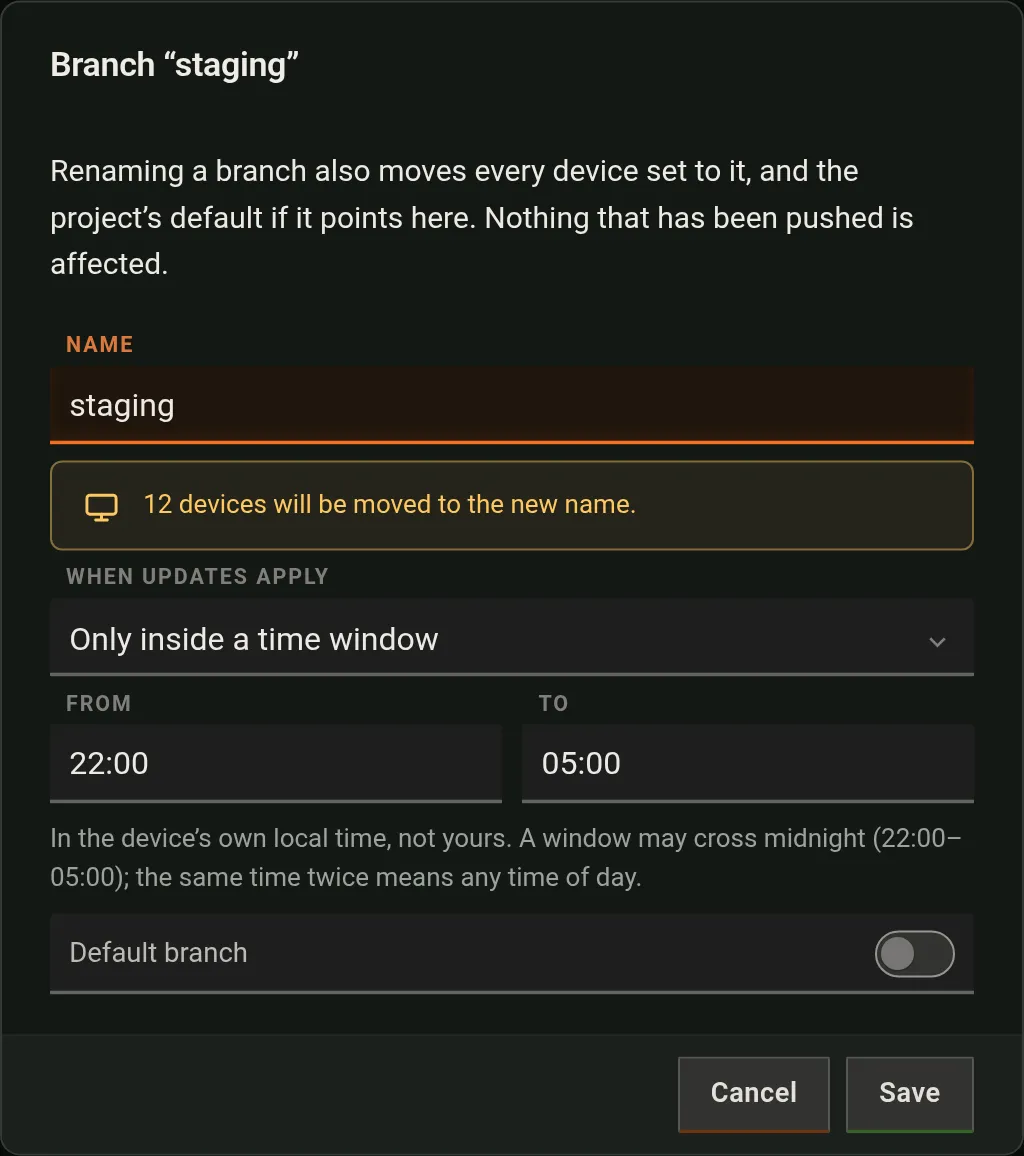
$ gh repo create northgate-digital/checkin-kiosk --private --source . --pushmain, its default — new devices go on it. Add more under Code → Add branch; the branch dialog's Default branch switch moves the default.index.html is the app's root — here app. One connection per project branch; two branches may read two repositories.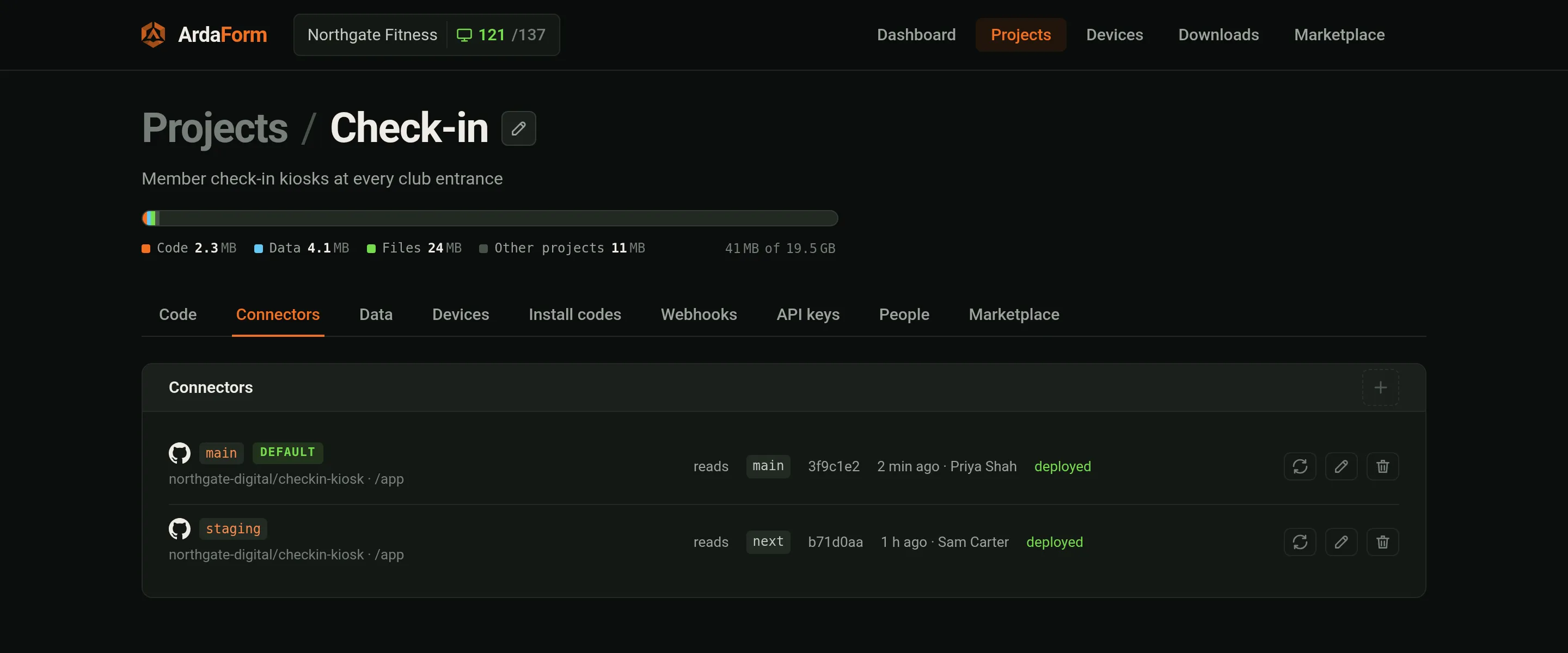
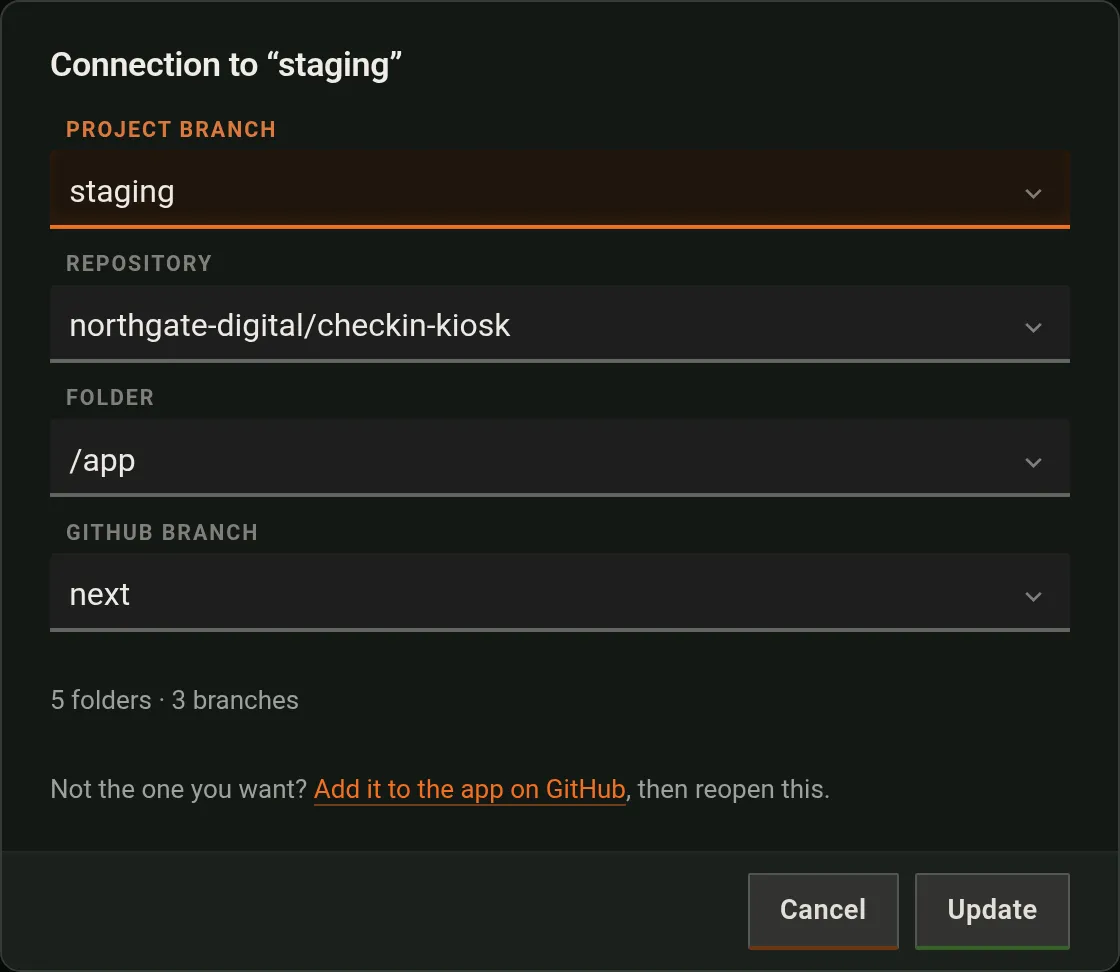
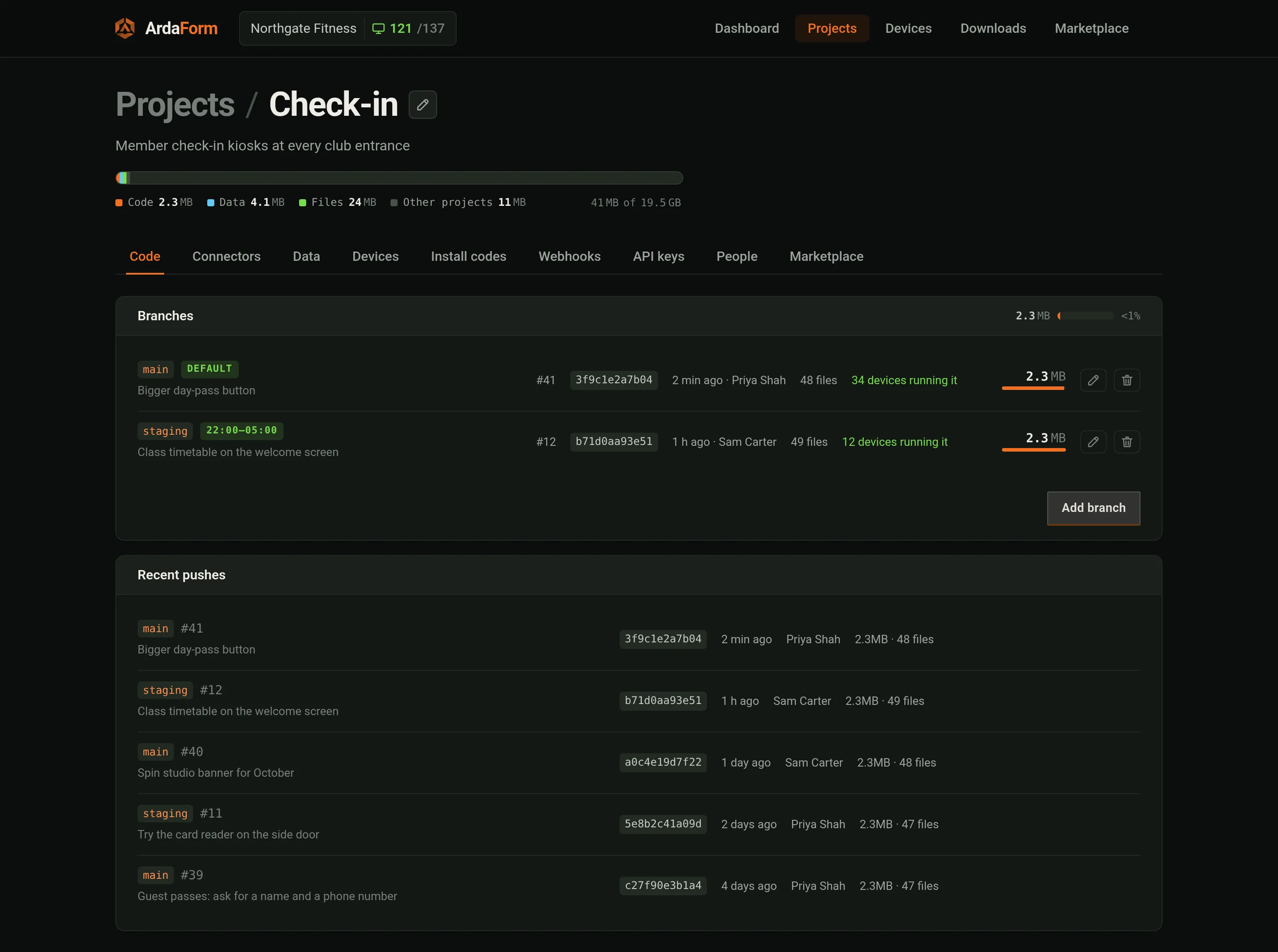
staging reading next.Now the branch has a source. The Code tab shows each branch's latest push, how many devices run the branch, and its apply policy — when a device that received an update may apply it:
| When updates apply | What the device does |
|---|---|
| As soon as they arrive (default) | Stages the update and asks the app at once. If the app says nothing for 5 seconds, it applies. |
| Only inside a time window | Stages it, and asks the app only inside the window (device local time; 22:00–05:00 crosses midnight correctly). |
| Only when the app asks for them | Stages it and waits for Arda.update.apply(). A restart does not apply it either. |
.arda container (gzip tar, AES-256-GCM; symlinks refused, dotfiles and .env* never included, 4096 files / 64 MiB), reconciles the manifest's datasets and settings, and sends the device a signed instruction naming the sha256 and the key. Package format has the details.
Three images, one player. Whatever you pick, the machine boots straight into ArdaPlayer with no desktop, no browser and no login.
ardaplayer-rpi-arm64.img.xz. Write it to a card with Raspberry Pi Imager, balenaEtcher or dd. Pi 3 and 4; HDMI or a DSI touchscreen — the image probes the panel at boot and configures itself. The first boot grows the card.
ardaplayer-linux-amd64.img.xz. Write it straight to the machine's disk (from another OS, or from a live stick). Boots UEFI or legacy BIOS; the first boot grows the root and mints its own host keys.
ardaplayer-linux-amd64-installer.img.xz. Write it to a stick, boot the target from it. It is ArdaPlayer running an install app: choose the disk, name the machine, join Wi-Fi, type an install code — by touch or keyboard. At the end it restarts into the installed system, even if the stick is already out.
$ xz -dc ardaplayer-rpi-arm64.img.xz | sudo dd of=/dev/sdX bs=4M status=progress conv=fsync
# /dev/sdX is the card (lsblk shows it). On macOS use Raspberry Pi Imager or balenaEtcher, which take the .img.xz directly.A Pi with a cable needs nothing. For Wi-Fi, either give it the network afterwards over Bluetooth (step 5), or put a file on the card's boot partition before the first boot — the player reads it at every start and restores the profile if it is ever lost:
ssid=Northgate staff
psk=the-password
# hidden=1 for a hidden network
On the USB installer the Wi-Fi step joins the stick itself to prove the password, then writes the same profile to the installed disk.
A published image carries no credentials. To be able to log in yourself, put your public key — one per line, several if you like — in arda-ssh.pub on the same boot partition (the Pi's card, the PC image, or the USB stick, which copies it to the disk it installs). The device adds it for its login user (pi on the Raspberry Pi image, arda on the PC) at every start. SSH from the network still stays closed until you open it from the portal (step 6); keys can also be installed from there.
The ArdaForm logo is drawn about 1.3 seconds after power, from the initramfs. (The PC image and the stick also carry it as BMP files on the boot partition, for firmware that lets you pick a boot logo.) The player starts, finds the display, and shows its boot screen until the app is running. Three states you will see:
1 · Unregistered: an activation code. Also findable over Bluetooth as arda-mx8c.
2 · Registered: fetching the app and walking the boot datasets and files.
2b · A code marked "needs approval" locks the device: no app until Approve is pressed.
A new device has an identity but no owner. Four ways to give it one; pick whichever fits the machine in front of you.
| The device… | Do this |
|---|---|
| has a screen | It shows an activation code. Portal → project → Devices → Add device → type the code, give it a name, a branch and a partition (picked by name when the manifest lists them). |
| is on the same network as your browser | Devices → Adopt lists devices dialling in from your network. Press Adopt. Nothing to type: being on the same network is the proof. |
| has no network and no screen | Devices → Adopt → the Bluetooth icon (Chrome or Edge). Pick its arda-xxxx name. The device is handed the Wi-Fi of the project's active profile (Devices → Profiles), joins, reaches ArdaForm, and is adopted with one press. |
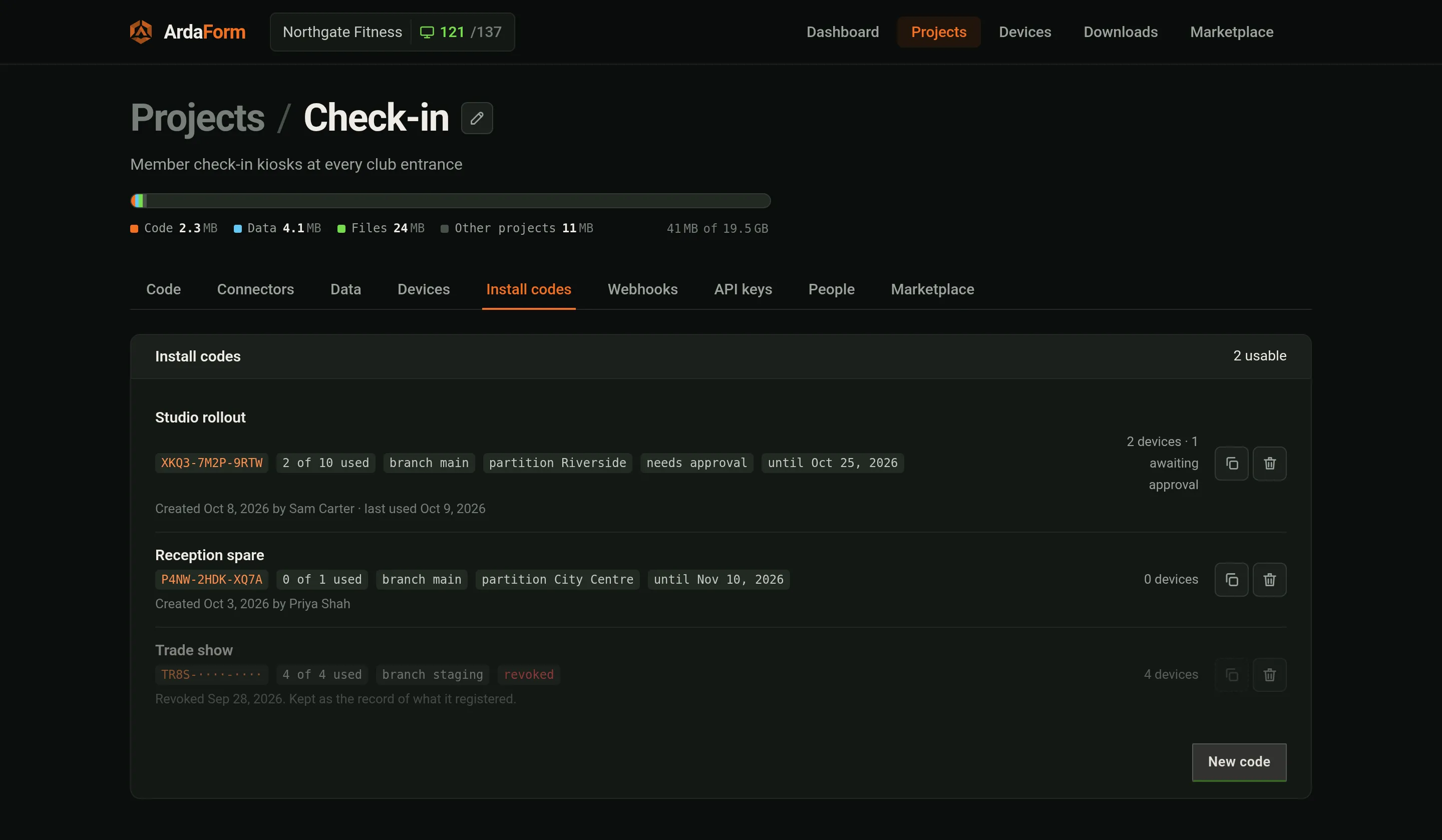
| is installed by somebody else, later | Install codes → New code. Put the code on the USB installer at install time. The device registers itself on first contact — locked until you press Approve if you said so. |
 ArdaFormProjects / Check-inNorthgate Fitness · 121/137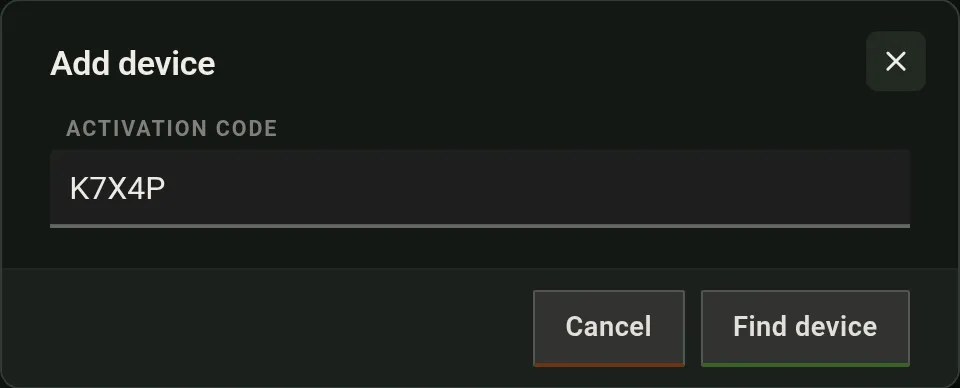
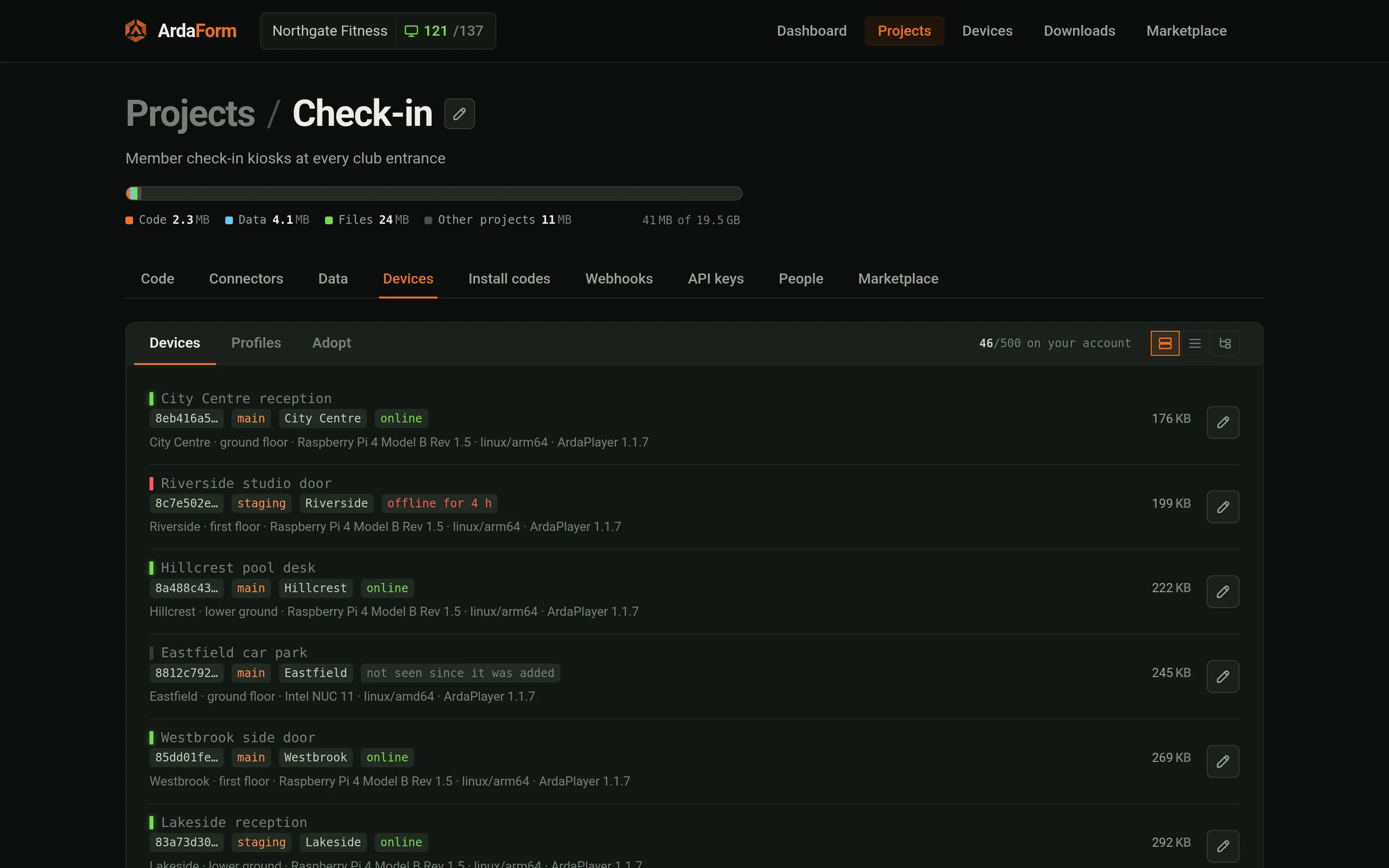
Within half a minute of adoption the device fetches its branch's package, walks its datasets and files, and starts the app when the boot set is current. Profiles (Devices → Profiles) are Wi-Fi networks kept per project. The active one is handed to a device you adopt over Bluetooth; a running device gets another network on its Peripherals tab.
Open the device. Seven tabs, one refresh, and everything comes over the device's own outbound connection — no port on its network is opened for any of it.
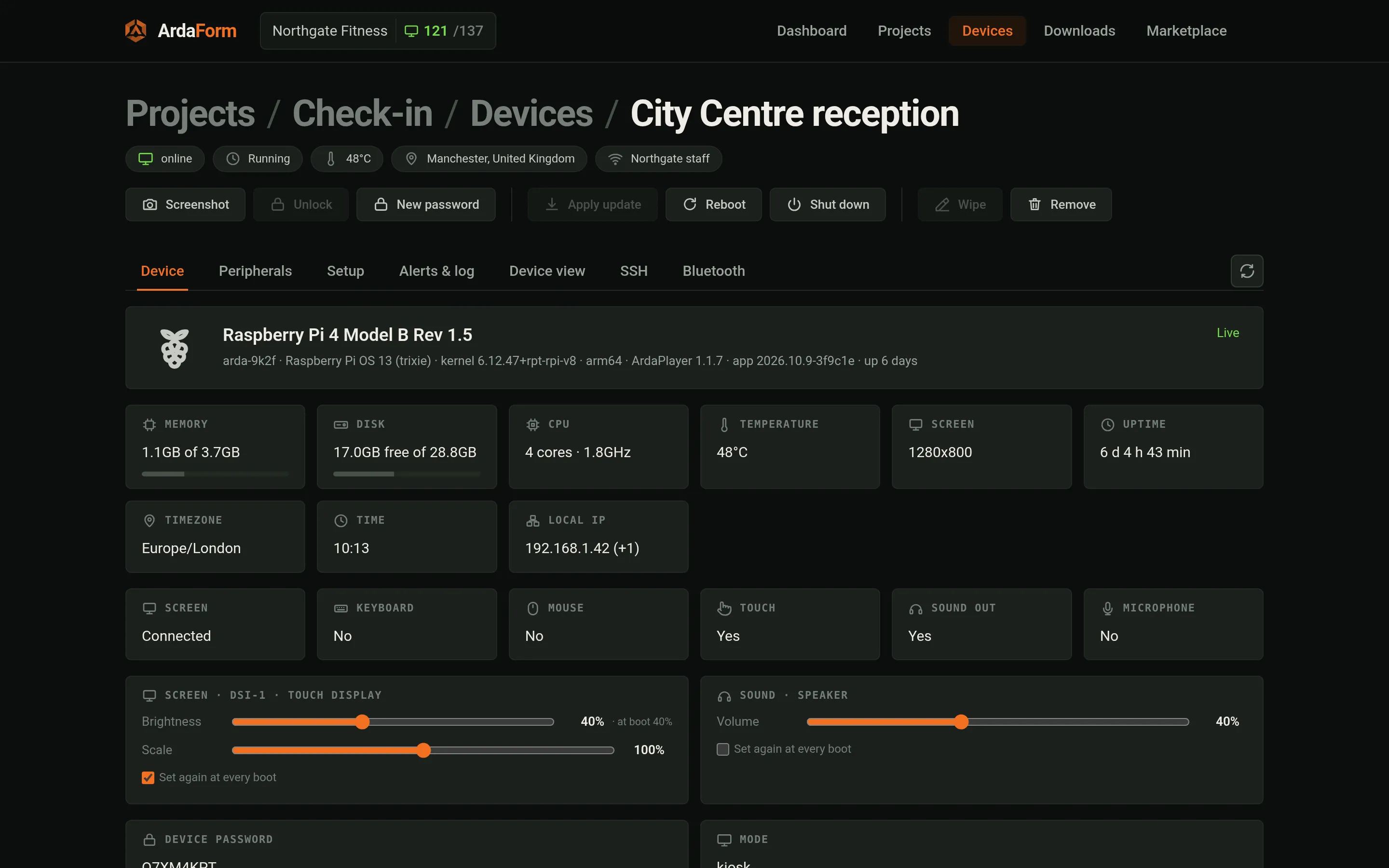
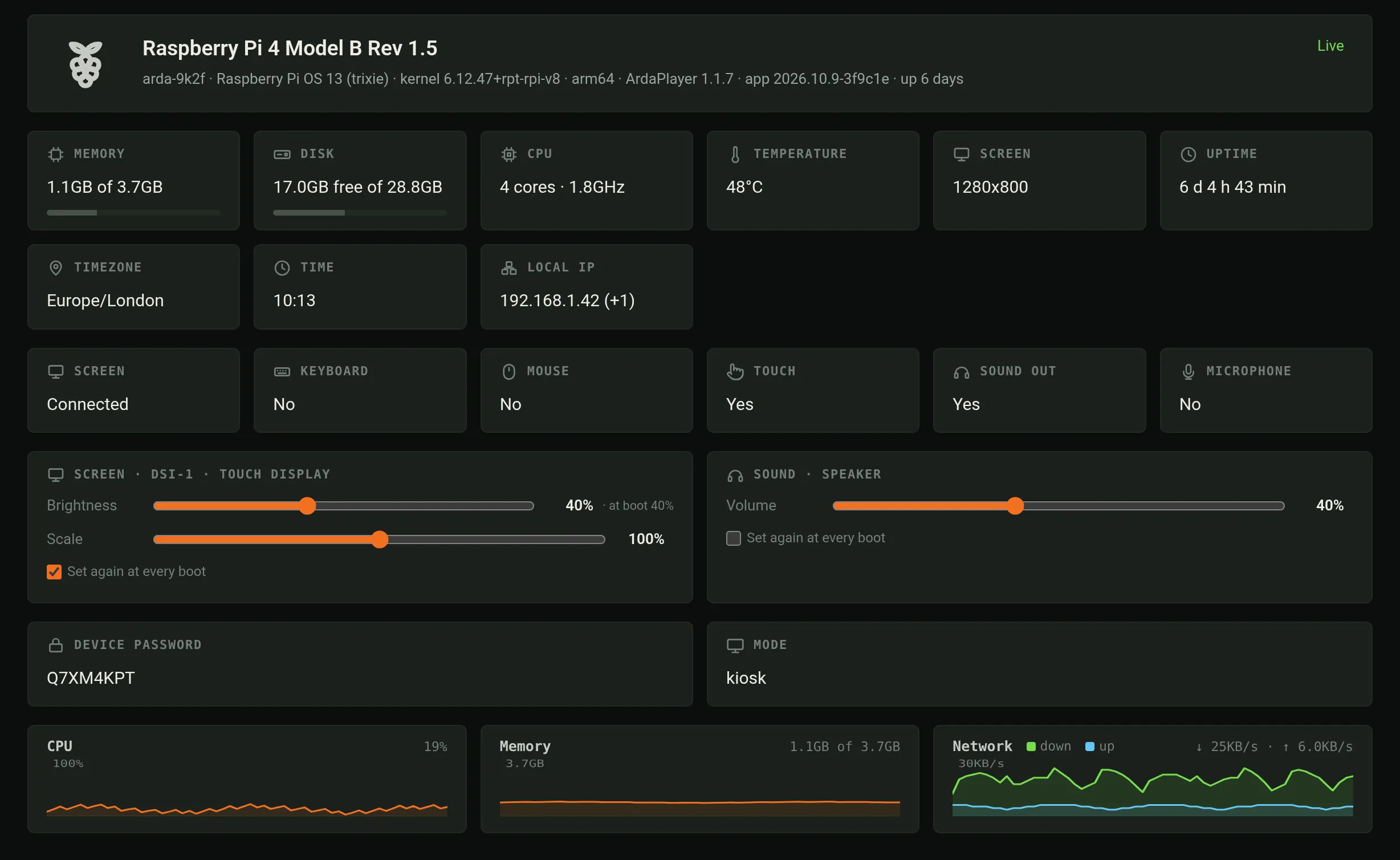
Above every tab sits the actions bar: Screenshot (a lossless picture of every attached screen), Approve (a device an install code held back), New password, Apply update, Reboot, Shut down and Remove.
| Tab | What it does |
|---|---|
| Device | Hostname, model, OS, local IP, player version, branch and what is deployed or staged, uptime, screens. Brightness, contrast and volume sliders — whatever the attached screen and card allow, HDMI monitors included — and a scale per screen from 50 to 150 %. The device password. |
| Peripherals | Wi-Fi (scan, test a password, save, forget, order), Bluetooth, printers (what was detected, an override for the paper width, four test prints), a serial probe for an unknown adapter, screens identified by their EDID rather than their socket, the system timezone. Network printers: Find printers on the network asks every address on the device's own network once for anything that takes print jobs on port 9100 — an office printer may appear too — lists what answered with its name and model where it gave one, and adds the one you choose; a printer the scan cannot see is added by its address. A network printer has a Remove action, and the width, protocol and test prints work for it as for a USB one. Needs the player release after v1.2.4. |
| Setup | Name, branch, data partition, per-device setting overrides — in the app's own settings page, if it has one. Changing the branch or partition resyncs the device: it drops its data, shows "Configuration changed — resyncing", and starts the app on the new data. Detection priority sets how soon the portal reports the device offline when it loses power or its network — about 35, 25 or 15 seconds, as your package allows. On a device with two monitors, Primary screen chooses which one the app is on: System order (the first connected socket) or a particular monitor, which the app then follows into whatever socket it is plugged into. Every other monitor can show a camera (Arda.camera.show); the app can make the choice too. Moving the app restarts it on the new screen. This needs a PC-type (x86) device installed from the v1.1.12 images or later; the Raspberry Pi image does not have it yet, and a device that only receives the newer player keeps one screen. |
| Alerts & log | Alerts the device raised (a printer it cannot write to, low power, a full disk). Log capture on demand: switch it on and the last few hundred lines that already happened arrive first; it switches itself off. |
| Device view | A picture of the screen, on demand or every 5, 10 or 30 seconds; the app's console as it happens; an expression evaluated in the page; the page source; and "Pretend a screen" for an HDMI device with nothing plugged in. |
| SSH | A root shell, opened by you, tunnelled over the device's connection. The plane asks the device for a target by name; a device offers ssh, view and shell and nothing else. Beside it, External SSH: port 22 from the shop's network, closed on every device behind its firewall until you open it here — for 30 minutes, 5 hours, until you close it, or while this screen is open. The device closes it on time by itself; an open door offers Extend or Close now. The user icon installs a user and a public key, expiring after a day, a month, or never. A user it creates has no password and no sudo — it can watch the app in the device view and read the logs; root is a tick, Passwordless sudo, given only with an expiry, and every key of that user then expires with it. Keys only, no root login. |
| Bluetooth | Reach this device over Bluetooth when it has dropped off the network: the networks it hears, the one it is on, and a join form whose password is encrypted to the device. |
ArdaFormProjects / Check-in / Devices / ReceptionNorthgate Fitness · 121/137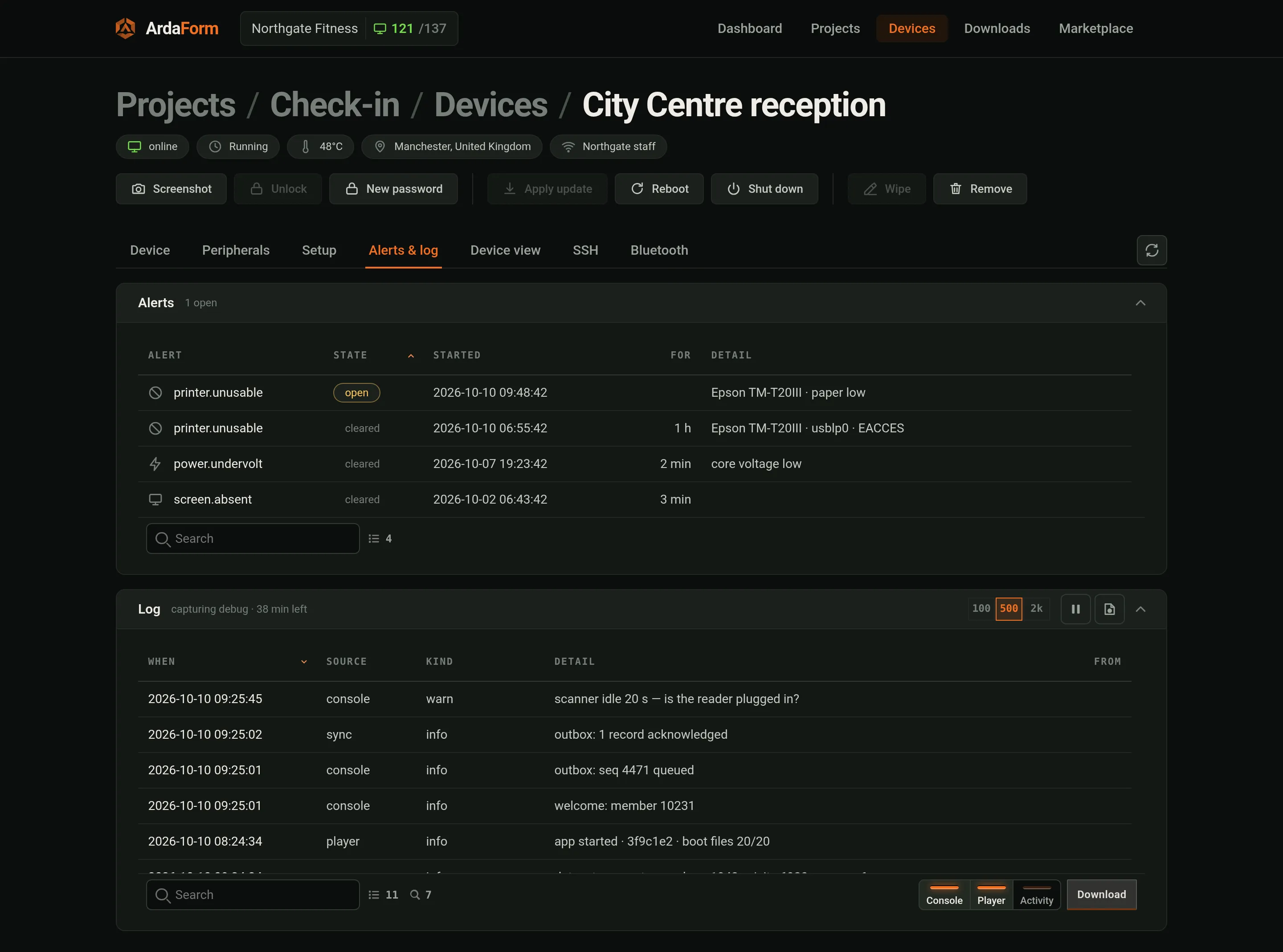
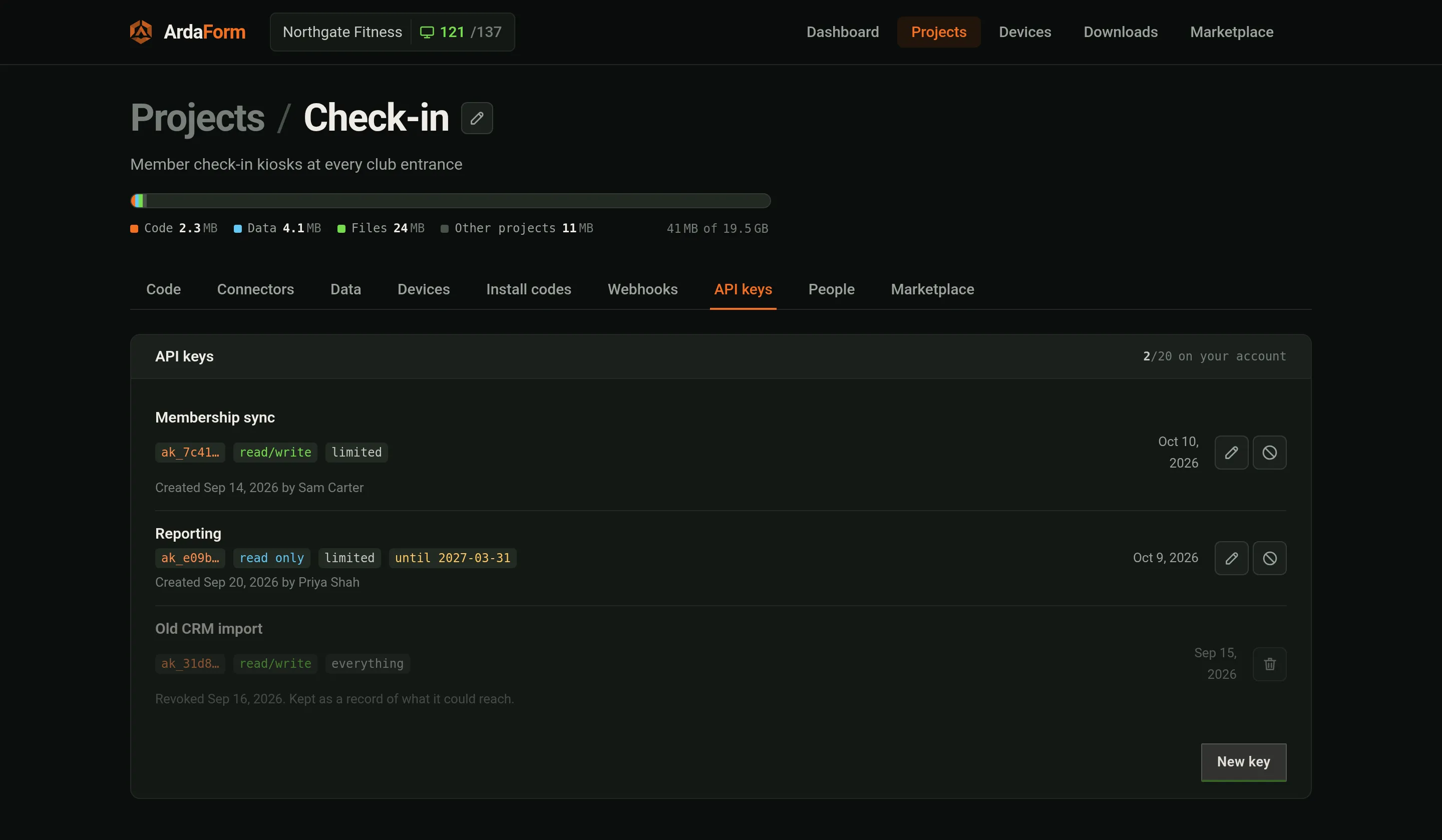
console.*, with capture switched on for a while.ArdaFormProjects / Check-in / Devices / ReceptionNorthgate Fitness · 121/137The project's Data tab holds the datasets the manifest declared, the records in them, and the files the devices sync. Records reach a dataset from devices (Arda.db.push), from the portal, or from the HTTP API with a key minted under API keys — api.ardaform.net/v1, described by /v1/openapi.json. A partitioned dataset sends each device only the records whose partition field matches the device's partition.
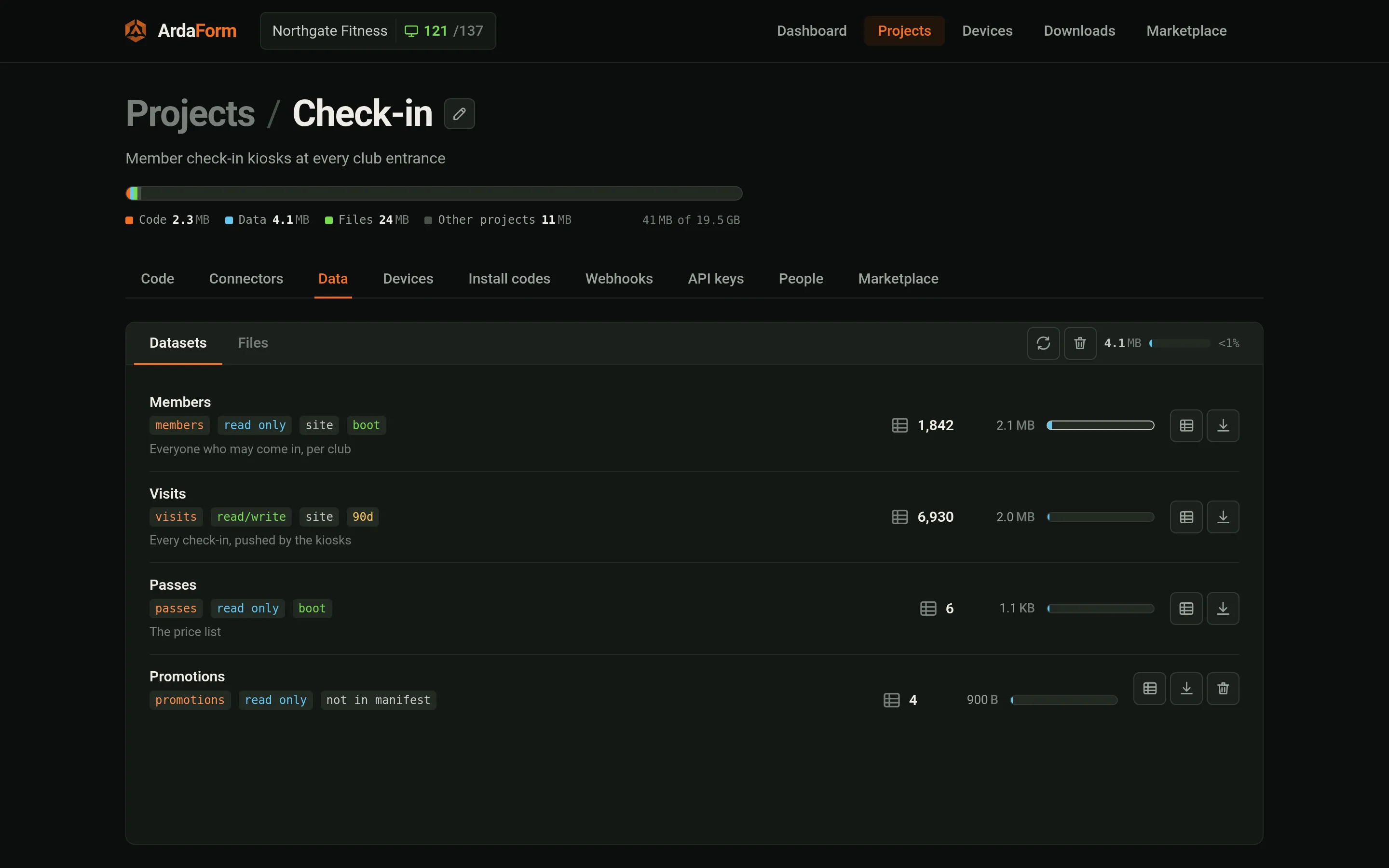
promotions is no longer in the manifest and is kept until you delete it.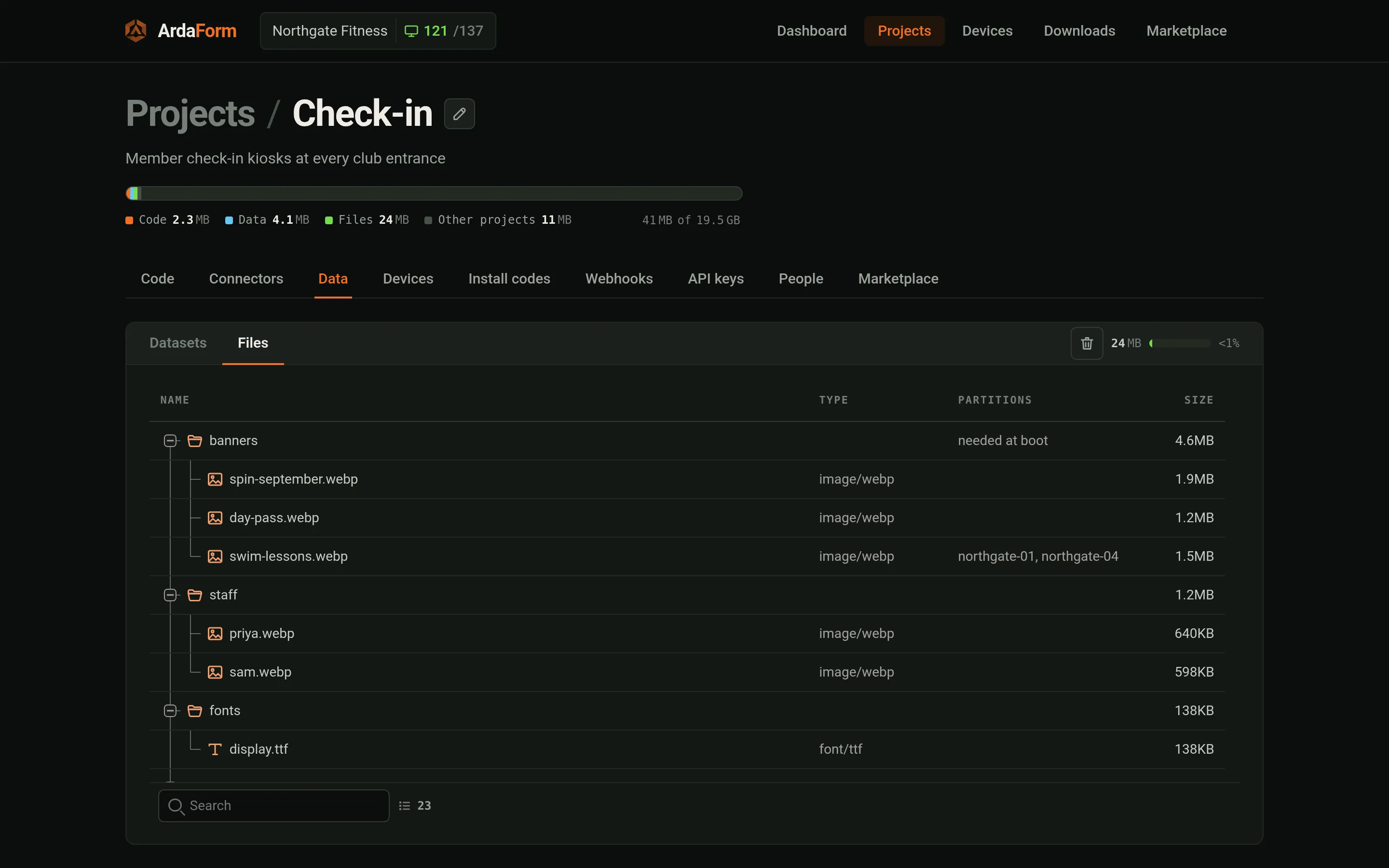
banners is needed at boot, and a file can be limited to some partitions.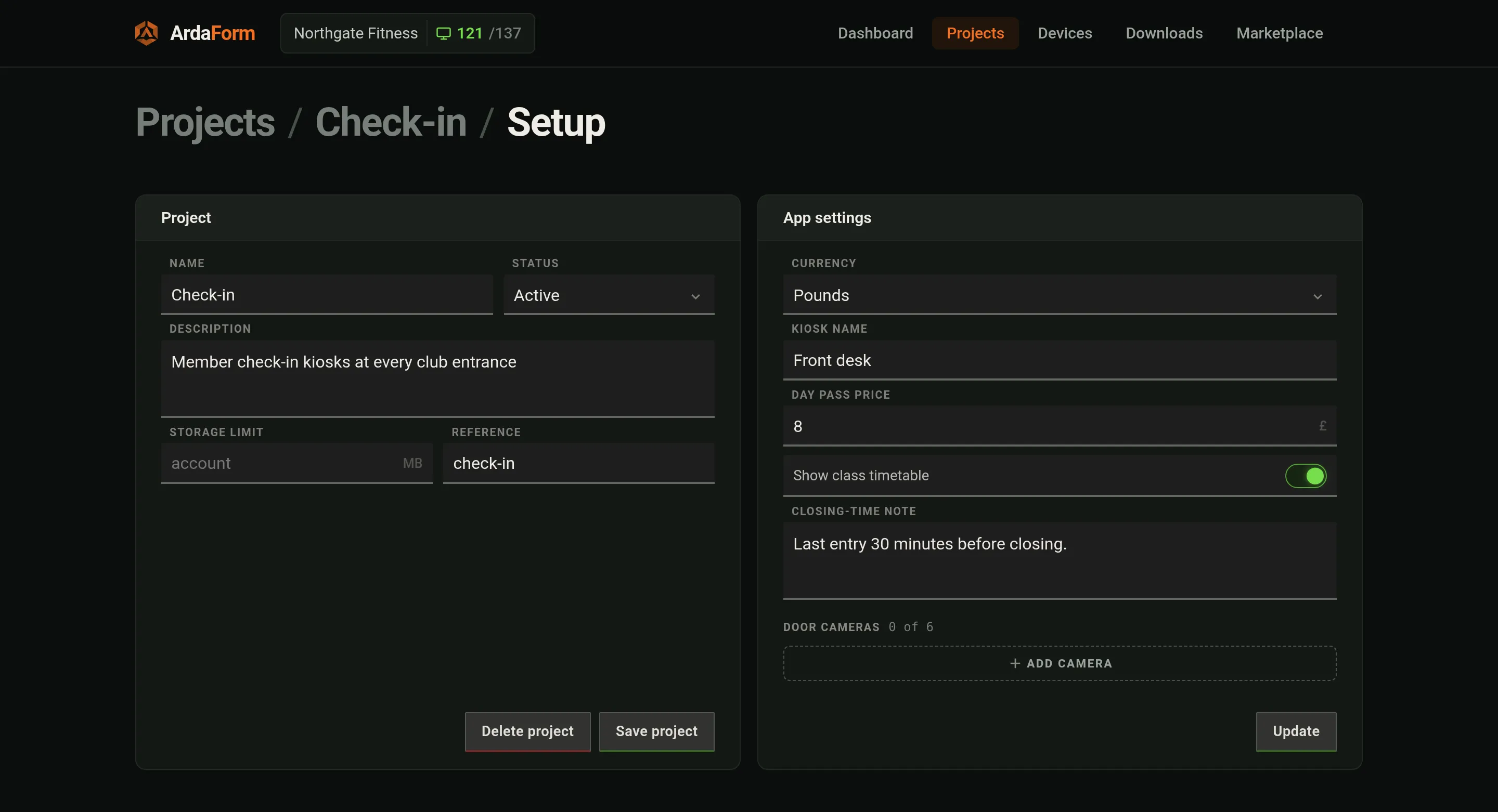
app/manifest.json; their values are set here (project-wide) or on a device's Setup tab. A saved change reaches a running device in about three seconds as Arda.config. An app with a settings page of its own shows that page here instead, with this form one click away.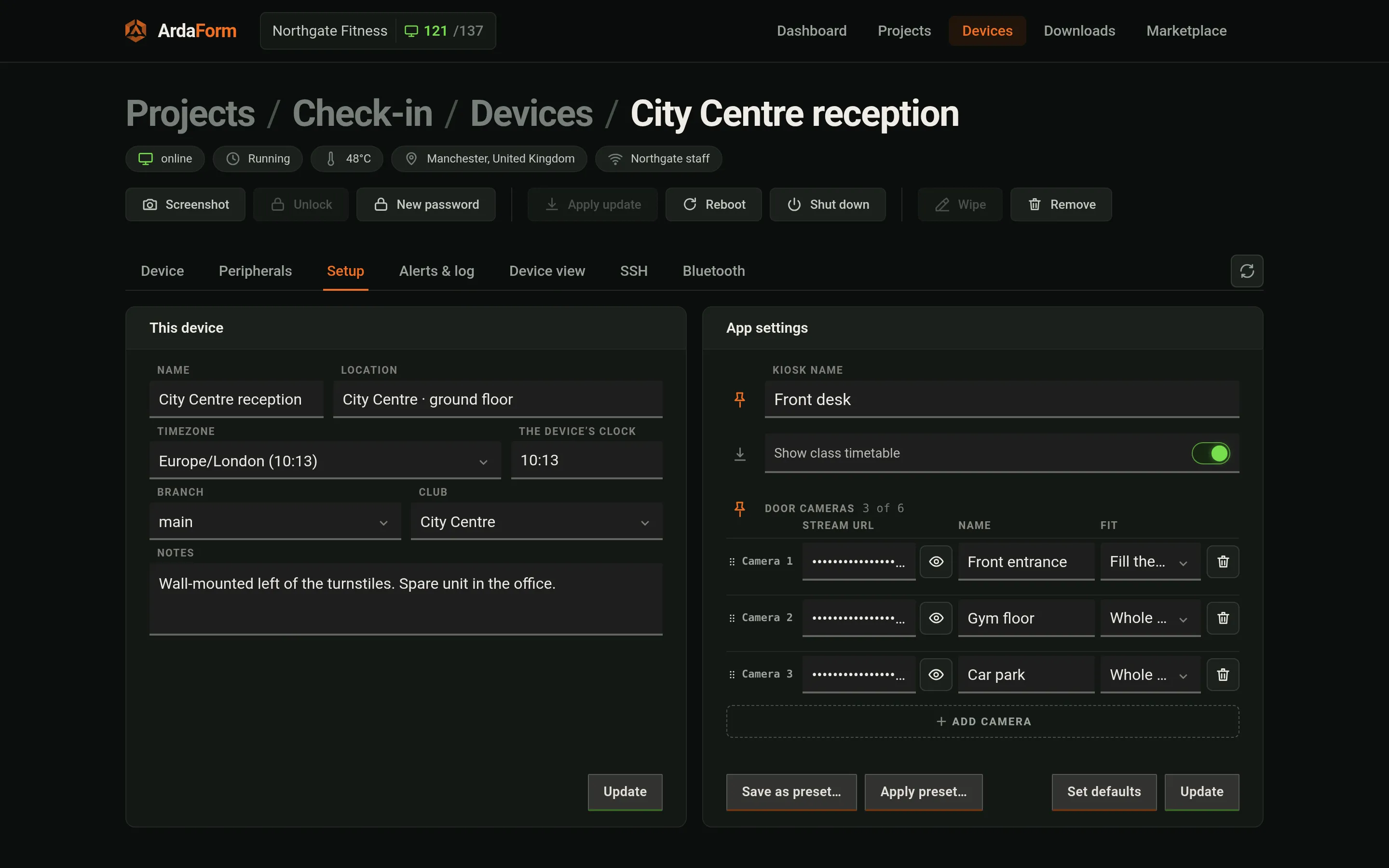
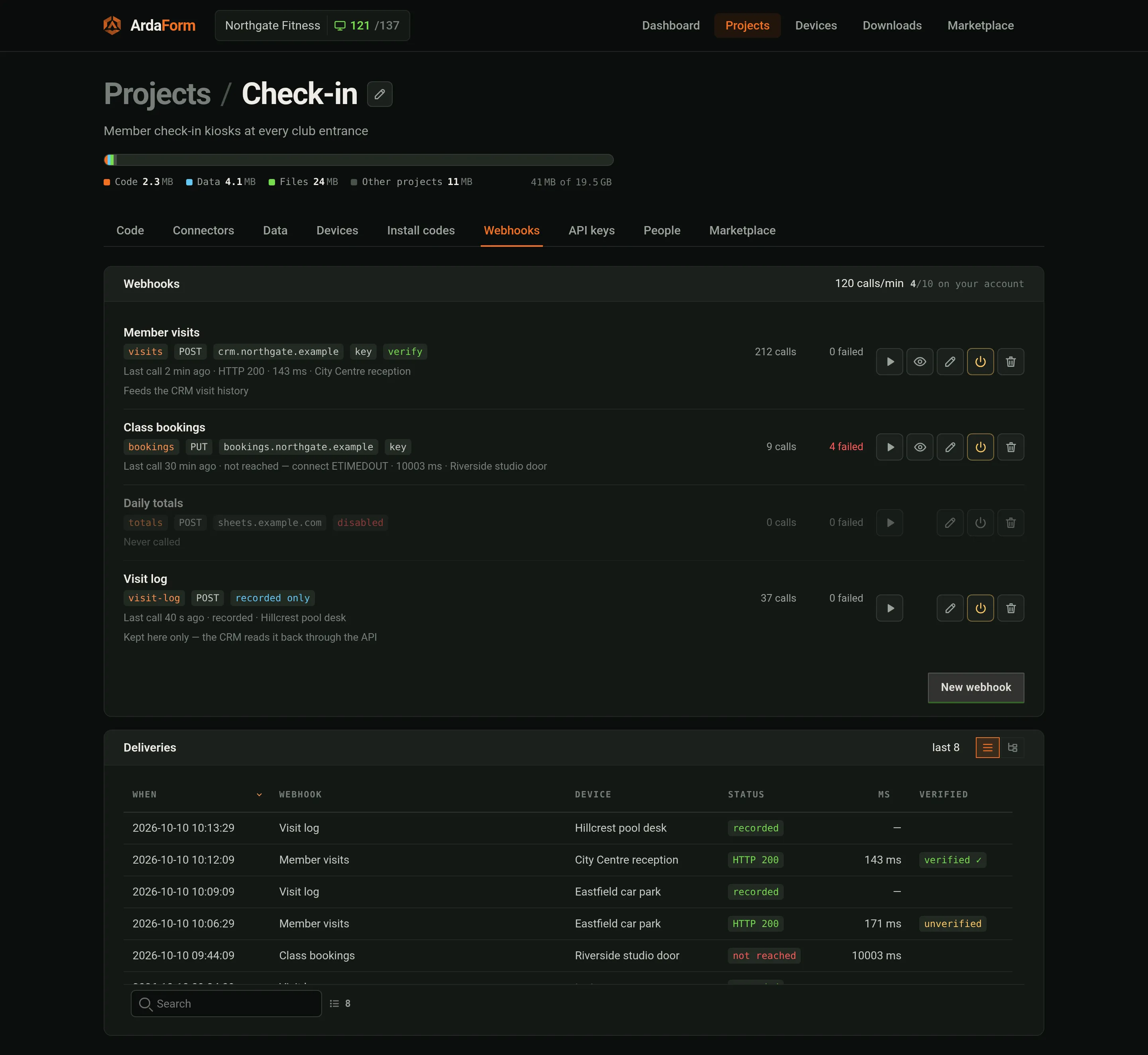
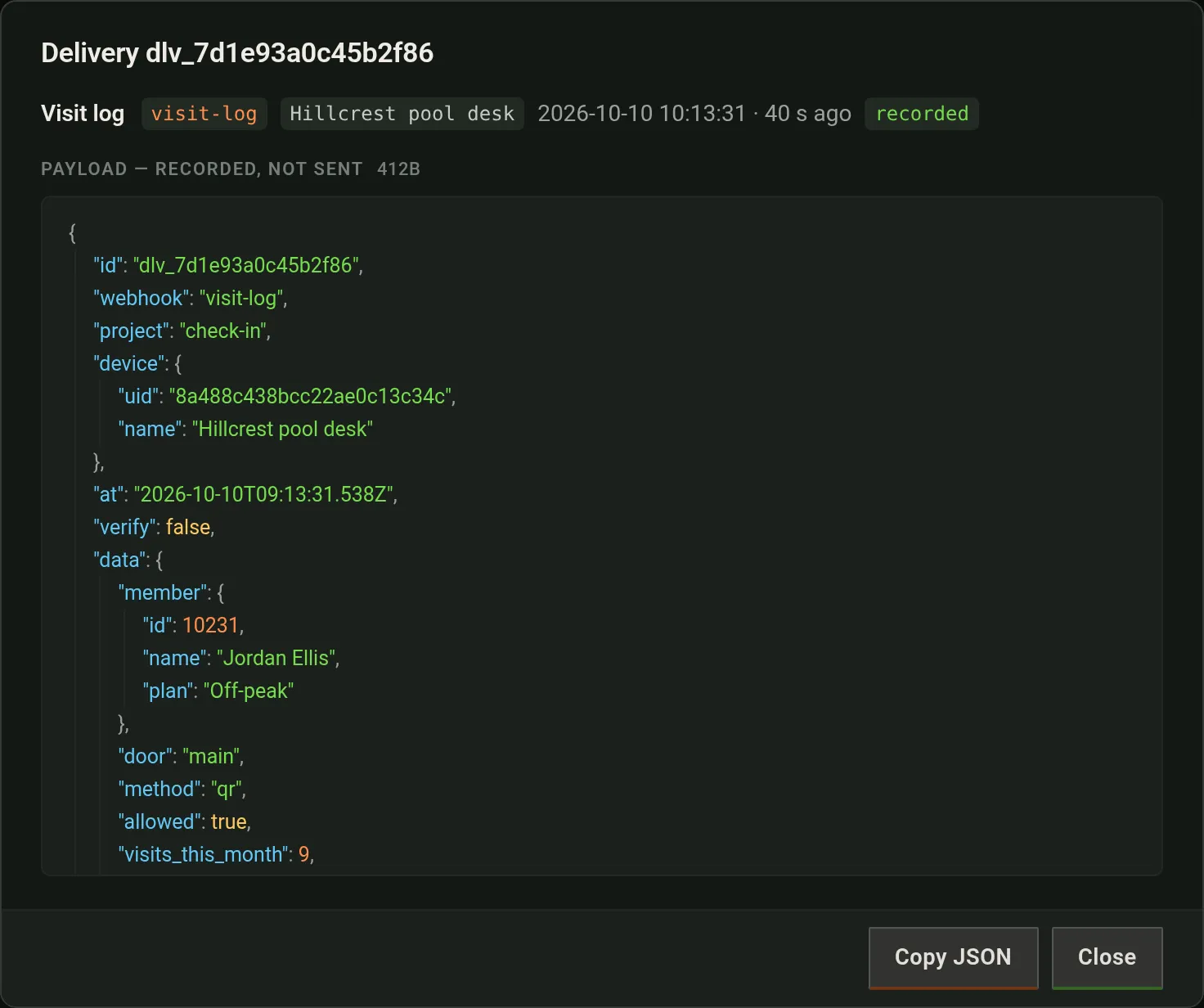
The project's Webhooks tab — or /v1/webhooks in the HTTP API — defines endpoints of yours the app may call: a name, a slug, the URL, the method (POST, GET or PUT), an optional key, Verify, and enabled. The app names one by its slug; ArdaForm makes the request from its own servers, so the key never reaches a device and your firewall has one source to allow. Every delivery is logged on the tab with its status, time and device. Leave the URL empty and nothing is sent: the calls are only recorded (the app gets ok: true, status 202), each opens in Deliveries as its JSON, and your own systems can read them back through /v1/webhooks/{slug}/deliveries.
// Resolves {id, ok, status, ms, body, error}. ok is a 2xx; a 4xx or 5xx is an answer.
// It rejects only when nobody was asked: offline, unknown or disabled webhook, the limit.
Arda.webhook.call('visits', { member: m.id, kiosk: Arda.config.kiosk_name })
  .then(function (r) { if (!r.ok) console.warn('CRM answered', r.status) })
  .catch(function (e) { console.warn(e.message) })
If you write the server at the other end: it receives JSON — {id, webhook, project, device: {uid, name}, at, verify, data} (a GET webhook gets the same fields as query parameters, device as its uid and data JSON-encoded) — with X-Arda-Delivery, X-Arda-Webhook, X-Arda-Project and X-Arda-Timestamp. With a key it also gets Authorization: Bearer <key> and X-Arda-Signature: sha256= the hex HMAC-SHA256 of timestamp + "." + body; with Verify on, a one-time X-Arda-Verify token it can confirm with POST /v1/webhooks/verify. ArdaForm waits 10 seconds, follows no redirects, refuses private addresses, and hands the app the first 4 KiB of the answer; data may be up to 64 KiB. Whether webhooks are included, how many an account may define and how many calls a minute it may make come with the package. On your desk, the webhooks list in arda.dev.json stands in for them.
Push. That is the whole of it from your side; the rest is what the device does with it.
updateStart fires. Say nothing and it applies in 5 seconds; pause() buys 60 seconds, up to five times; apply() does it now. After five pauses it stays staged until the next restart or an operator's Apply update.A new ArdaPlayer release is a signed instruction too, naming the build for the device's OS and architecture with its sha256. The device downloads it, runs it once to prove it starts, and arms it for the next restart — the running process is untouched until then. If the new build cannot stay up for ninety seconds three starts in a row, the device puts the previous one back by itself. A release marked important goes through the same five-second negotiation with your app instead of waiting for a restart.
A device leaves in one of three ways, and each leaves a different trace.
ardaplayer -unbind at the device does the same from its own side. It asks for the device password — eight characters the portal shows on the Device tab and can reissue with New password; the device holds only a hash of it. The control plane forgets first and the device erases itself second, so an interruption is safe to repeat. The row fades as a "ghost" over seven days.Deleting a whole project does the same for every device in it: each one stops being able to fetch code or files at once, is wiped the next time it connects, and has to be claimed again in person, from the code on its own screen. A device removed in any of these ways no longer goes on running what it had.
| You see | It usually means |
|---|---|
| "Registered — waiting for this device's application" | The device's branch has no connection, or the connection's folder has no index.html. Check Connectors, then the Code tab's head. |
| "Waiting for approval" | It registered with an install code that needs approval. Press Approve on the device screen. |
| The app runs but shows nothing / empty lists | The device's partition matches no records, or a boot dataset is still walking. Arda.db.status() in Device view says which. |
| "The device service is not answering" | The device is restarting (an update, a reboot, a timezone change). Try again in a moment; the log tab says why it left. |
| Device view has no picture on a headless Pi | Nothing is plugged into HDMI, so there is no screen to capture. "Pretend a screen" gives it one at 1024×768 until a real one is attached. |
| A pack fails with a manifest fault | The portal refuses an unknown manifest key or a bad value at pack time and lists every fault; a device never sees a broken manifest. |
| Bluetooth "connection failed" on a reflashed card | Every installation now has its own Bluetooth name and address, so a computer that paired with an earlier card connects first time. A card from an older image kept the board's address: forget the arda-… device in the OS's Bluetooth settings once. |
ssh to the device times out | External SSH is closed — on every device, by design. Open it from the device's SSH tab; it closes itself when the time you chose runs out. The portal's own shell works either way. |
| The device came back with "Recovery" | The last run ended in a power cut or a kill. Its stores are intact (every write is temp + fsync + rename); it is telling you, not asking for anything. |
The same guide is published as plain Markdown at ardaform.net/deployment.md, and the platform summary at /llms.txt. The facts an assistant needs most, in one block:
app folder     myapp/app/index.html (+assets), myapp/app/manifest.json (datasets, settings, files.needForBoot)
dev file       myapp/arda.dev.json beside app/ — never packed; keys: window scale bg console watch can screens device settings partition devices webhooks
settings page  myapp/gui/settings/index.html beside app/ — never sent to a device; shown in Setup › App settings and a device's Setup tab (paid plans); helper <script src="/_arda/gui.js"> (ArdaGUI)
run locally    ardaplayer -dev myapp/      (local; "device": true enrols the folder as a device)
headless       ardaplayer -headless myapp/ (no DOM; Arda.headless === true)
api            window.Arda — device() config db.dataset() db.push() db.status() on() update.* keyboard() screens.* screen[name] audio.* camera.* webhook.call() system.* wifi.* printers.* serial.*
deploy         GitHub App https://github.com/apps/ardaform → portal project → Code (branch) → Connectors (branch ← repo, folder, ref) → git push
images         portal Downloads: ardaplayer-rpi-arm64.img.xz · ardaplayer-linux-amd64.img.xz · ardaplayer-linux-amd64-installer.img.xz
wifi on a Pi   /boot/firmware/arda-wifi.conf: ssid=… psk=… [hidden=1]
adopt          activation code (Devices › Add device) · Devices › Adopt (same network) · Bluetooth (Chrome/Edge, arda-xxxx) · Install codes (XXXX-XXXX-XXXX, optional approval)
apply policy   per branch: asap (default) · timed HH:MM–HH:MM device time · manual; app: Arda.on('updateStart'), Arda.update.pause()/apply()
retire         portal Remove (wipe) · Forget completely (row deleted, wipe kept a year) · deleting the project (every device wiped on its next connection) · ardaplayer -unbind (device password)